Purpose and location
Control caller identity, PAI, Diversion and approved custom X-headers.
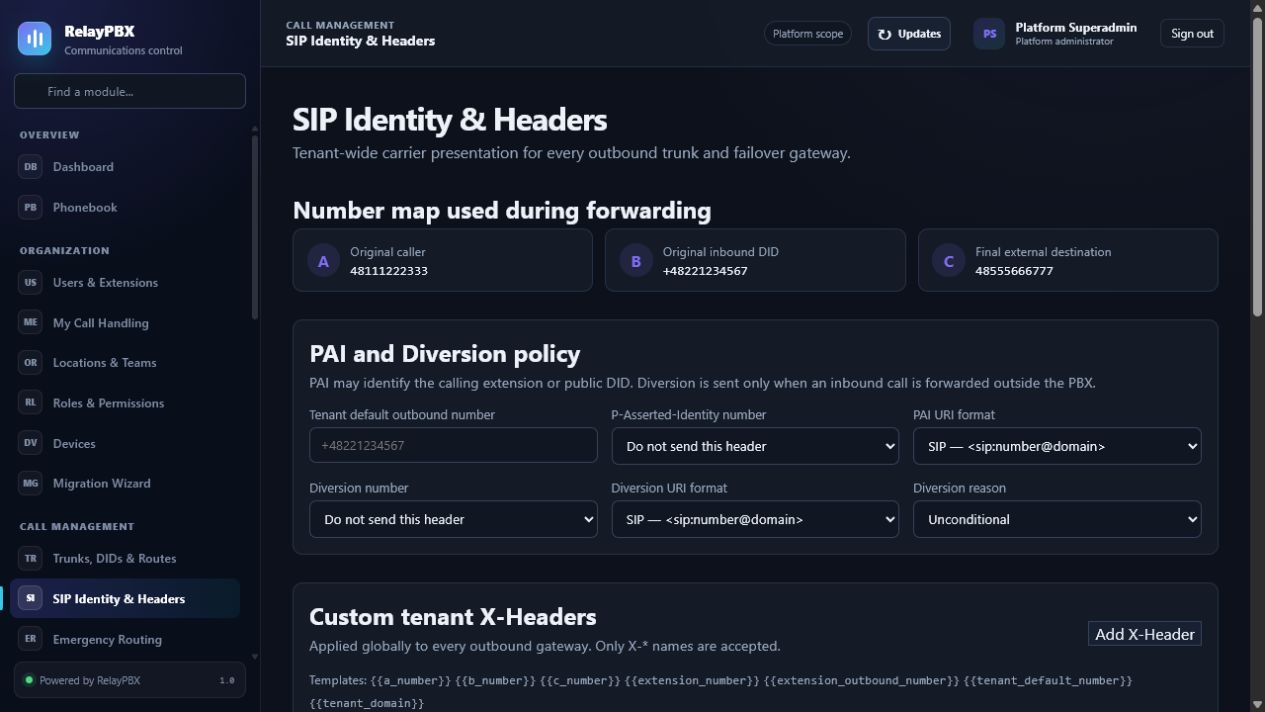
Open Call management → SIP Identity & Headers. The available controls depend on the active edition, module entitlement, role and tenant scope.
Before you start
Write down the current source and destination path before editing it. Keep a registered test extension, a rollback destination and Calls & Reports open for validation.
Capture the current value or export the affected records before a bulk or routing change. This gives the operator a precise comparison point and makes a supported transaction undo easier to assess.
Step-by-step workflow
Complete the steps in order. Do not combine an initial configuration with unrelated cleanup; small, attributable changes are easier to test and reverse.
- Choose identity sources for direct and forwarded calls.
- Limit custom headers to an allowlist.
- Test INVITE and redirected-call scenarios with the carrier.
- Retain diagnostics for acceptance.
Field reference
Use the reference below while completing the form. Fields hidden by edition, module entitlement or role are intentionally unavailable to the signed-in user.
- From policy
- Selects the visible A, B, C, DID or extension identity.
- P-Asserted-Identity
- Trusted network identity presented to the carrier.
- Diversion
- Original/redirecting party information for forwarded calls.
- Custom X-headers
- Tenant-wide allowlisted headers with controlled values.
Acceptance checks
A saved record is only the beginning of validation. Run every relevant check below and retain the call-session ID, time and result when telephony is involved.
- Inspect one direct, forwarded and transferred outbound INVITE.
- Confirm PAI and Diversion contain only carrier-approved identities.
- Verify custom headers are absent on trunks that do not explicitly allow them.
Common mistakes and safe recovery
If a check fails, stop adding changes. Restore the previous value or use a supported transaction undo, regenerate PBX configuration, then repeat the smallest failing test.
- Identity headers can expose personal numbers or break carrier screening; test each scenario with the carrier.
- Do not permit arbitrary header names or CR/LF characters in values.
What to include in a support case
Provide the tenant, module and object name, local time with timezone, expected result, observed result and the most recent successful state. For a call problem, include the logical call-session ID and the redacted SIP/SDP text diagnostic before requesting PCAP.
Never paste passwords, private keys, raw license payloads or unredacted customer media into a ticket. Use the one-time diagnostic grant and attachment controls when support requests additional evidence.